
21 August 2026
Your First Time Hosting on Tolivi: A Host's Guide
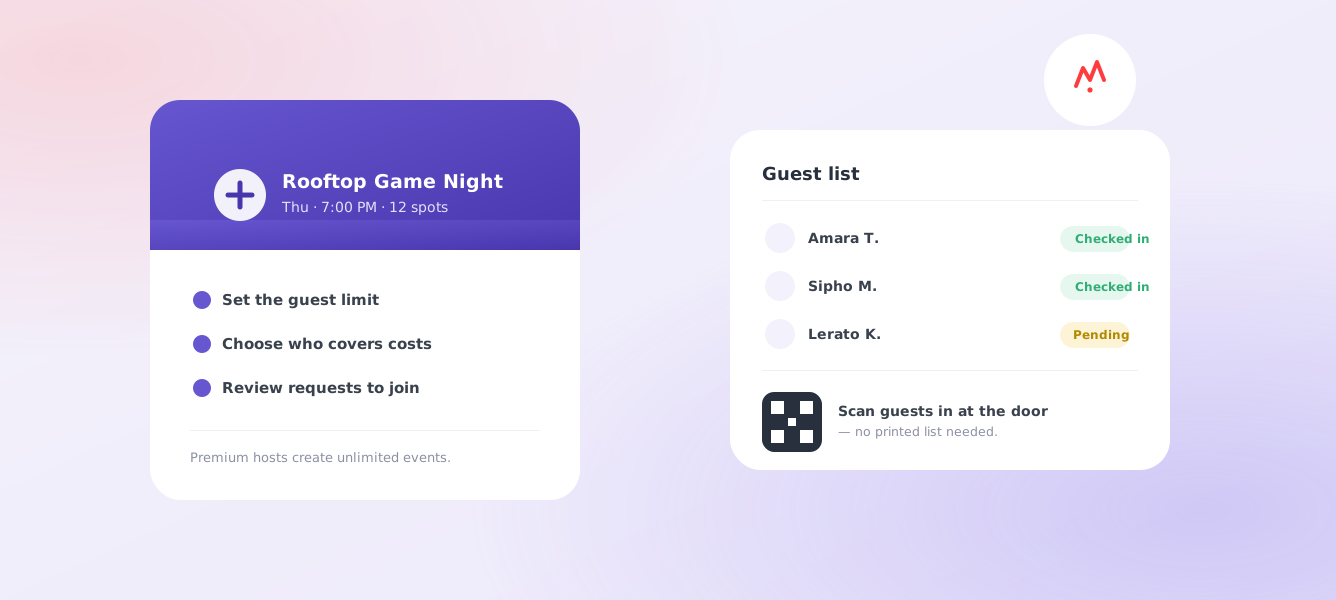
Hosting your first event on Tolivi takes less time than deciding what to wear to it. Here’s exactly what happens, from the tap of “Create” to the moment your first guest walks in - plus the small decisions that make a first event go smoothly rather than awkwardly.
Pick something you were doing anyway
The most common first-time mistake is inventing an event from scratch. You don’t need to. The easiest first host is something already in your week: the walk you take on Saturday morning, the new restaurant you wanted to try, the games night you keep meaning to organise. If the event would happen with or without guests, there’s no pressure on it - and no wasted evening if only two people come.
Things that work well for a first event: a morning hike or coastal walk, brunch or coffee at a place you already like, a board-games or trivia night, a photography walk through your own neighbourhood, a casual after-work drink. Things to save for later: anything needing tickets bought in advance, anything where a no-show costs you money, and anything you’d be upset about if the group didn’t gel.
1. Name it and set the basics
Pick a type - anything from a hike to a dinner to a games night - add a location, a date and time, and a guest limit. Keep the limit small for your first one; six to eight people is plenty to get a feel for hosting, and a smaller group actually talks to each other rather than splintering.
Spend a minute on the title. “Sunrise walk and coffee after” tells someone what their morning looks like. “Walk” doesn’t. The description is where you answer the questions people would otherwise have to message you about: how long it runs, what to bring, whether there’s parking, how hard the walk is, whether it’s dog-friendly.
2. Decide who covers what
Tolivi asks you to be upfront about cost from the start - host covers it, guests cover their own, split evenly, or free. There’s no ambiguity for anyone deciding whether to ask to join, and no uncomfortable moment when the bill lands.
For a first event, “guests cover their own” or “free” is usually the least friction. Splitting evenly works well for a booked table or a shared cost like a court hire, but it’s worth naming the rough amount in the description so nobody is guessing.
3. Review requests as they come in
Once your event is live, requests to join start landing in your inbox. You see each person’s profile before you decide - accept the ones that feel right, and the exact location only unlocks for them once you do. You’re never obligated to accept everyone who asks.
If someone has linked their Instagram to their Tolivi profile, you can see it while they’re on your waiting list - which is often enough to get a sense of whether they’ll fit the group. Worth knowing: profiles aren’t browsable publicly, and yours becomes visible when you create an event, so the visibility is mutual rather than one-sided.
4. Message your guests - privately, one at a time
Every accepted guest gets their own private chat with you. Answer questions, send a reminder the morning of, or share a last-minute change of plan - each guest only sees their own conversation with you, never anyone else’s. Eight guests means eight private threads, not one group chat carrying everyone’s name and number.
A short message the day before does more for attendance than anything else you can do: confirm the meeting point, the time, and one practical detail. People who have heard from the host turn up.
5. Check people in at the door
On the day, open your guest list and scan each guest in with the built-in QR check-in - no printed list, no awkward “what was your name again?” You’ll see at a glance who’s arrived and who hasn’t yet, which matters when you’re deciding whether to wait five more minutes or set off.
Setting an age minimum
Every Tolivi account is 18 and up. Beyond that, you can set a minimum age on your own event - useful for anything from a quiet book club to a late-night rooftop hang where the mix matters.
After the event
Event chats clear automatically seven days after the event ends, so you don’t accumulate a long tail of old conversations from people you met once. If anyone made you uncomfortable at any point - before, during or after - you can block and report them from their profile or your chat. Blocking is immediate and mutual: neither of you can find, message or request to join the other’s events again.
If it went well, the easiest second event is the same one again. Regular hosts tend to build a group that comes back, which is a much lower-effort way to keep a social life going than starting from zero every time.
A few things that make hosting easier
- Start small. A first event with six guests teaches you more than a big one with forty.
- Set expectations in the description. Dress code, what to bring, parking - the fewer questions guests need to ask, the smoother the day goes.
- Reply to requests quickly. People are deciding on their afternoon - a fast accept (or decline) respects that.
- Pick a meeting point, not just a place. “The bench by the north gate” beats the name of a large park.
- Host as often as you like. Free hosts can run events regularly; Premium hosts get unlimited events, can message guests before they even ask to join, and add extra photos and a fuller description to their event page.
Common questions
Does it cost anything to host?
No. Tolivi is free to download and free to host on. You only ever decide who pays for the activity itself - the app doesn’t take a fee to list an event.
What if nobody asks to join?
Pick something you were doing anyway and it costs you nothing. In practice, clearer titles and a filled-in description make the difference - people join plans they can picture themselves in.
Can guests see each other before the event?
No. Chat only ever runs between you and each guest individually. Guests can’t see or message one another, so your event never becomes a shared contact list.
Do I have to accept everyone who requests?
No. You review each request and decide, and the exact location is only shared with people you accept. Declining needs no explanation.
How far ahead should I post an event?
A few days to a week is the sweet spot for a casual event. Long enough for requests to come in, close enough that people still know what their weekend looks like.
That’s genuinely the whole process. No forms, no fees to list an event, no waiting on approval to go live. If you’ve got something happening this week, open Tolivi and put it up - someone nearby is probably looking for exactly that.